Edit Menu
Editor Edit Menu
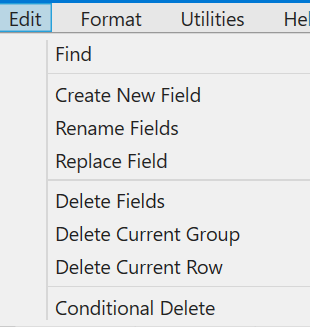
Use the Edit menu to: find , create, rename, replace (using if-then constructs); delete fields, lines and samples (rows); and conditionally delete lines.
Use Find to find the next (or previous) database sample that satisfies a logical condition. The condition is evaluated using the NCalc expression engine – see description and examples below.
Users can Replace Field using if-then-else constructs. Users can also delete current groups or rows. In these case the group/row is defined by the position of the cursor. The use of these tools is described in more detail below.
Using The Replace Field Tool
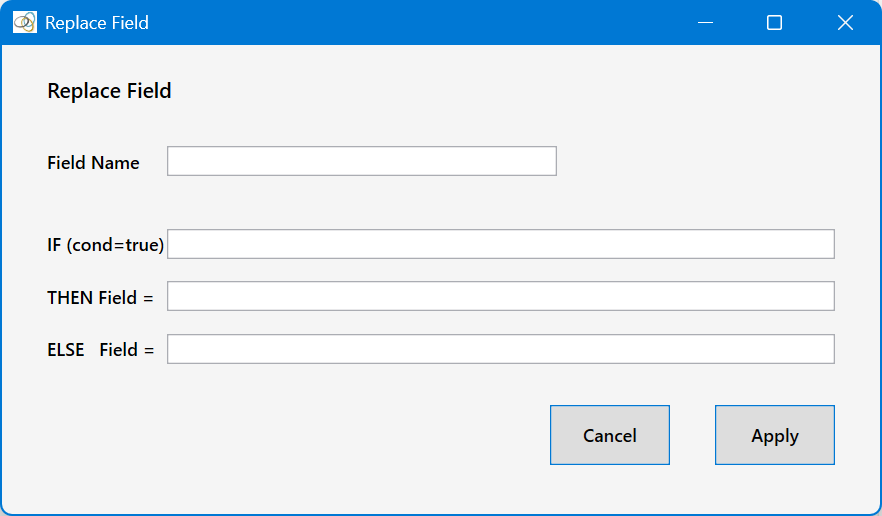
Specify the name of a field in the Field Name text box. If the field does not exist, you will be prompted to create one. Specify a condition in the IF text box that resolves to either true or false, and specify expressions in the THEN andELSE text boxes that resolve to numerical values. Expressions are evaluated using the NCalc expression engine (ncalc.github.io/ncalc/). If the IF textbox is left empty, then it defaults to true. In this case, the ELSE textbox can be left empty as well. Replace Field tool replaces all values (where the IF expression is true) across all rows and lines (groups) in the database for the target field.
The values for the target field can be calculated using: other database fields; row position; group/line position; mathematical expressions and logical conditions. The values are for each row (sample) in the target field using the corresponding rows in the other database fields (where specified). Fields are referred to by their names (eg. altitude, easting, totalcount). Multi-band fields are referred to as fieldName:bandNumber (eg. spectrum:1).
Special Variables
Special variables that can be referred to in the expressions are:
$GROUP – the group (line sequence number in the database), starting at 1;
$ROW – current row/sample number within the current line, starting at 1;
NULL (or null) – the null value for the target field.
Relational and Logical Operators
The following relational operators can be used in logical expressions:
= equal to
== equal to
!= not equal to
<> not equal to
< less than
<= less than or equal to
> greater than
>= greater than or equal to
The logical operators are:
and
or
not
although &&, || and ! are also recognised as alternatives to the above.
Arithmetic Operators
The following arithmetic operators can be used in expressions:
+ add
- subtract
* multiply
/ divide
% remainder
( ) grouping brackets
Mathematical Functions
The following functions can be used in expressions:
abs(x) absolute value
acos(x) arc cosine
asin(x) arc sine
atan(x) arc tangent
ceiling(x) round up
cos(x) cosine
exp(x) exponential
floor(x) round down
int(x) integer part
ieeeremainder(x,y) IEEE remainder
log(x) natural logarithm
log10(x) base-10 logarithm
max(a,b,...) maximum
min(a,b,...) minimum
pow(a,b) a to the power b
round(x) round to nearest integer
sign(x) sign of value
sin(x) sine
sqrt(x) square root
tan(x) tangent
truncate(x) remove fractional part
Conditional Functions
if(condition, value_if_true, value_if_false)
iff(condition, value_if_true, value_if_false)
In this case the condition is evaluated; if true, use the second argument; if false, use the third argument. Since the function evaluates to a value, using this syntax you could place "if(condition, value_if_true, value_if_false)" in the THEN textbox, and this will be equivalent to:
IF textbox: condition
THEN textbox: value_if_true
ELSE textbox: value_if_false
Difference Functions
There are two acceptable forms for the difference function:
DIFF(field) – current value minus previous row value
DIFFN(n, field) – current value minus the value n rows earlier
For example, DIFF(altitude) or DIFFN(3, altitude). DIFF1(altitude) and DIFF3(altitude) are also acceptable.
Note
- The replace operation replaces a value across all rows and all lines in the database (where the condition is true)
- If a referenced value is null or unavailable, the result generally becomes the target field NULL value.
- If a DIFF or DIFFN value cannot be calculated because the earlier row does not exist, the target NULL value is used.
Examples
- Convert feet to metres: altitude * 0.3048
- Create a value from group and row number: $GROUP * 1000 + $ROW
- Use a multi-band field: spectrum:12 / spectrum:1
- Avoid divide by zero: if(cosmic > 0, totalcount / cosmic, NULL)
- Remove sudden jumps: if(abs(DIFF(altitude)) > 5, NULL, altitude)
- Keep only non-negative values: max(totalcount, 0)
- Combine conditions: if((altitude > 100) and (cosmic > 0), totalcount / cosmic, NULL)
Using The Conditional Delete Tool
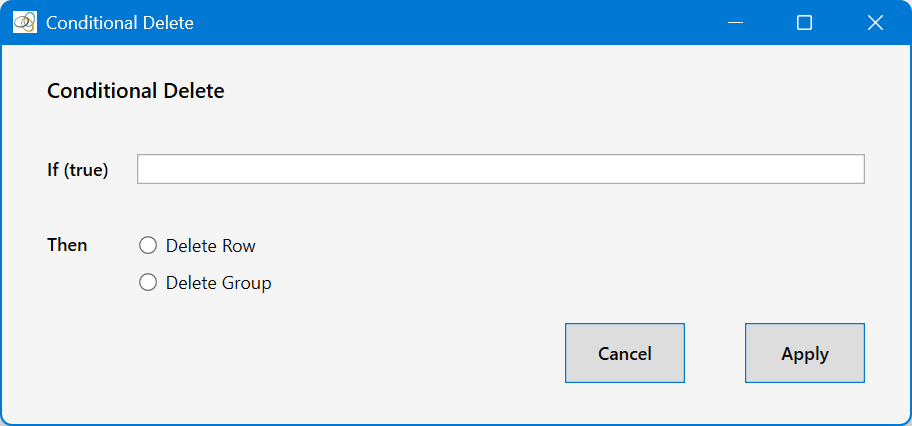
For Delete Row selected, the Conditional Delete tool will delete all rows int the database (across all groups/lines) where the condition is true. For Delete Group selected, the Conditional Delete tool will delete all groups (lines) in the database where the condition is true.
Use with extreme caution.