Trim Grid Overlaps
Trim Grid Overlaps: Trims grids such that they only overlap along their margins. Grids are read from the input directory, trimmed, and written to the output directory. The grids are trimmed in reverse priority order – low priority grids are trimmed in preference to higher priority grids. If, after trimming, a grid is all nulls, then it is not written to the output directory and a warning message is displayed in the Messages list box.This means that you will have to create a new Priority Order for use with Get AbsoluteShift/Scale And Apply or Merge Grids/Feather And Merge Grids, as there must be a one-to-one relationship between the Priority Order and grids in a directory.
The aliases and parameters that must be set for this process (via the Set Aliases and Parameters menu) are shown in the table below.
|
Control File Keyword |
Type |
Description |
|
inputGridDirectoryTrimOlap |
string |
The input grid directory. This is a sub-directory of the Working Directory. |
|
outputGridDirectoryTrimOlap |
string |
The output grid directory. This will be created in the Working Directory. |
|
priorityOrderFileOlap |
string |
Priority Order File . |
|
maxOverlapDistance |
integer |
The maximum grid overlap in metres. |
Trim Grid Overlaps will take advantage of any Grid Memory Cache. You can specify the maximum amount of memory for the cache via the Set Aliases and Parameters menu, or you can specify it using the control file using the memoryCacheSize keyword (integer). This sets the memory cache size in MB.
Cleaning grids after Trim Grid Overlaps
After trimming the grid overlaps, some grids will require manual editing to remove unwanted grid elements in the overlap areas. These are sections of grids that will not be visible in the final merge (they are overlain by higher-priority grids) but occur as remnants in the overlap areas. An example is given below.
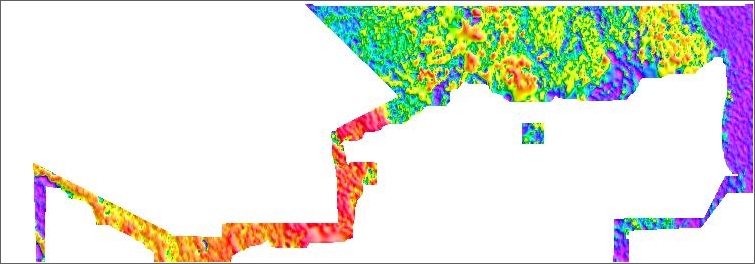
The Create Jpegs From Grids utility is a convenient means to generate jpegs to identify which grids may require further editing. Use Boundary View (run on the overlap-trimmed grids) to see which portions of a particular grid are likely to contribute to the final merge. Then use Sub-Section a Grid to remove unwanted sections. These sections can otherwise interfere with the levelling and introduce unwanted artefacts into the final feathered merge.