File Menu
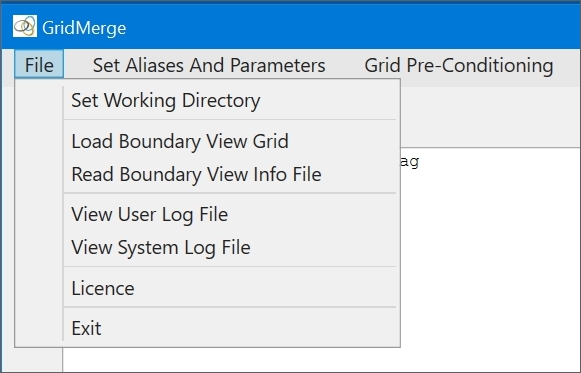
Use the File menu to set the Working Directory, load a Boundary View grid and associated Boundary View Information file, view log files, or access the Licence Manager.
The Working Directory is the starting point for any "Open File" or "Save File" dialogue. So all the project's files and grid sub-directories must be placed in the Working Directory (see "Directory Structure" in the Data Preparation section). The Working Directory must be set before any of the items in the Utilities menu are enabled. Also, both the Working Directory and the Aliases and Parameters must be set before the items in the Grid Pre-Conditioning, Grid Levelling, and Grid Merge menus are enabled.
The Boundary View is a way of representing grids so that their extent can be visualised even where they overlap. When a Boundary View grid is combined with its associated Boundary View Information file, it provides the capability for identifying individual grids.
GridMerge automatically opens log files to log debug information, warnings and error messages, and to track processing progress and save output for the user. There are two types of log files:
- The System Log File stores debug information, warnings and error messages.
- The User Log File stores the output from executed processes and tools.
The License menu item is used to request, install or view the license.
Quick Link: See Boundary View for a full explanation of Boundary View, and how it is used in GridMerge.
Quick Link: See Using Log Files for a full explanation of how log files are used in GridMerge.