Get Grid Tilts And Apply
Get Grid Tilts And Apply tilts the grids using adjustments calculated from the overlap points in the Overlap Points File. Estimates a plane surface for each grid that, when subtracted, results in the best fit in the overlap areas. Grids are read from the input directory, adjusted, and written to the output directory.
The aliases and parameters that must be set for this process (via the Set Aliases and Parameters menu) are shown in the table below.
|
Control File Keyword |
Type |
Description |
|
inputGridDirectoryTilt |
string |
The input grid directory. This is a sub-directory of the Working Directory. |
|
outputGridDirectoryTilt |
string |
The output grid directory. This will be created in the Working Directory. |
|
overlapPointsFileTilt |
integer |
The Overlap Points File. |
|
controlLineWeightTilt |
float |
Preferential weighting of Control Lines relative to grid-to-grid overlaps. |
|
baseGridWeightsTilt |
float |
Preferential weighting of Base Grids relative to other grid-to-grid overlaps. |
|
shiftOnlyName |
string |
Shift-only grid name. Any number of "shiftOnly" grids can be specified. These will be constrained to a shift only (no tilt) adjustment in the analysis. |
|
baseGridTiltName |
string |
Base grid name. Can specify multiple base grids. If control lines have not been used to generate the overlap points, then at least one base grid must be specified. |
Check the output to see what adjustment has been made to the control lines/base grid. These should be should be close to 0 (for all 3 tilt plane parameters). If significantly different, raise the controlLineWeightTilt/baseGridWeightTilt parameters.
Poorly-constrained grids and "shiftOnly"
Consider the grid distribution below, where the vertical white lines are control lines.
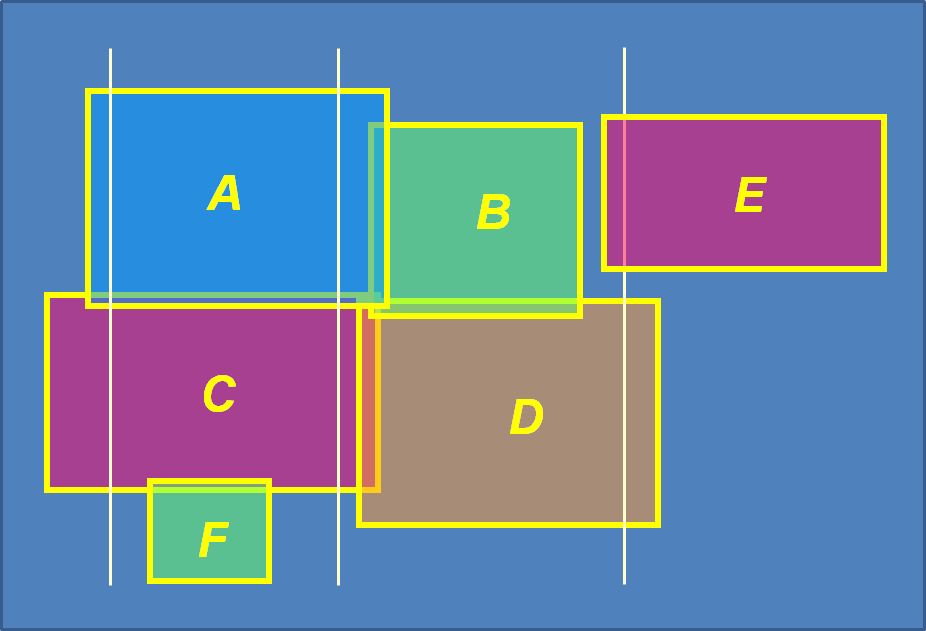
Grids E and F are not well-constrained for a tilt adjustment, and should be specified as "shiftOnly" grids in the control file.